Golf Simulator Projector Aspect Ratio: 16:9 or 4:3 for Your Screen?
Evidence: Research-led guide. This article uses projector specifications and general display-format guidance. It is not based on hands-on testing of a particular simulator or projector.
Choosing a projector for a home golf simulator is not just about brightness or resolution. Its aspect ratio determines the shape of the image you are trying to put on the impact screen. That affects how much of the screen you use, whether the picture needs cropping, and how natural simulator software looks from the hitting area.
For most modern home setups, 16:9 is the straightforward starting point. It matches the native format of many current home-entertainment projectors and suits a wide screen. A 4:3 setup can still make sense where the room or impact screen is comparatively narrow, but it is not automatically a better use of space.
First, what does aspect ratio mean?
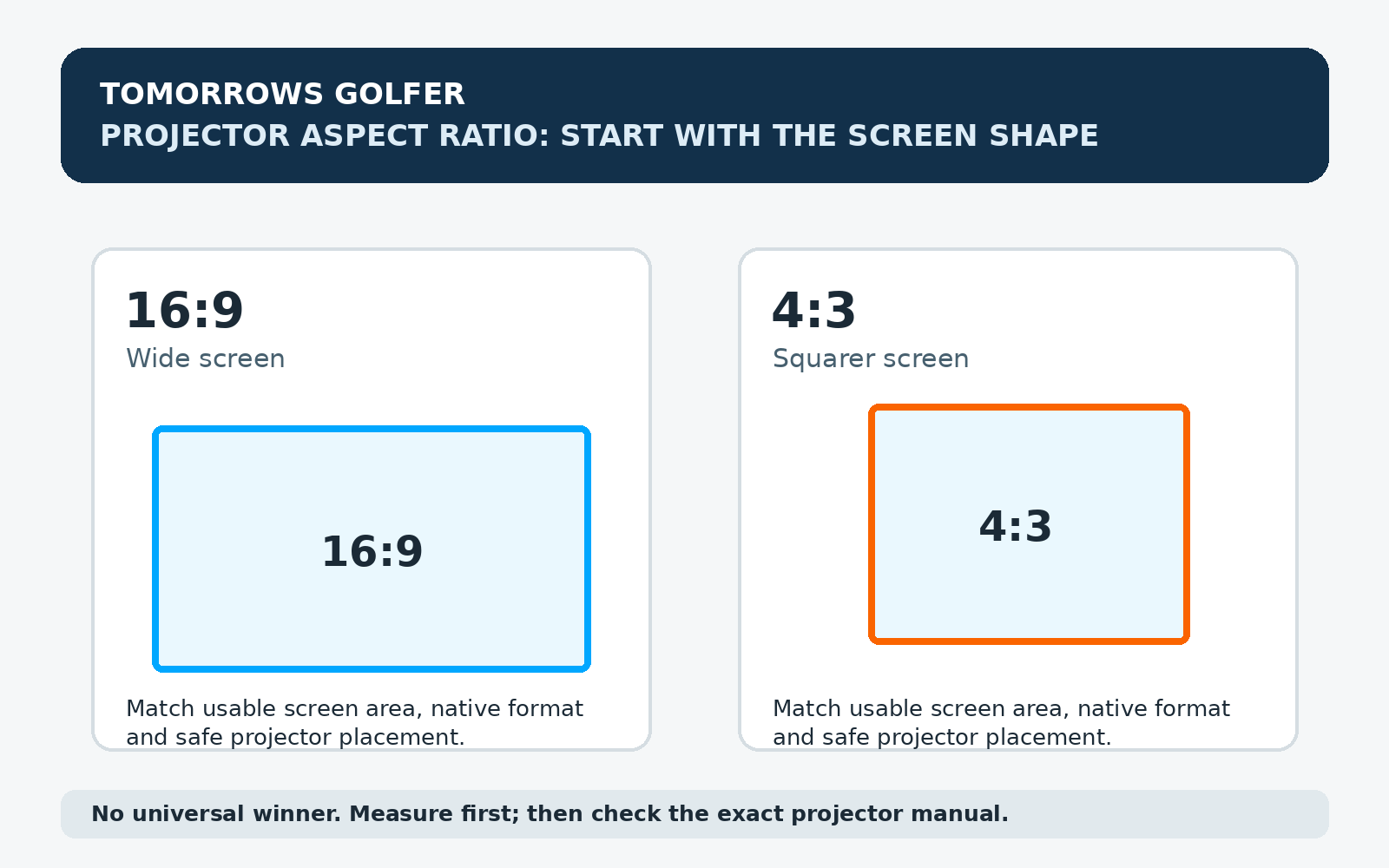
Aspect ratio is the relationship between the width and height of an image. A 16:9 picture is wider than it is tall. A 4:3 picture is less wide for the same height, so it looks more square.
It is separate from resolution. A projector can have a high pixel count and still be designed around a particular image shape. Resolution tells you how much detail is available; aspect ratio tells you the shape of the frame that detail sits in.
That distinction matters in a simulator because the screen is part of the room plan. Before buying, measure the usable impact area rather than the outside edge of a frame or enclosure. Allow for bungees, side protection, the projected border and any area you deliberately leave unused.
When 16:9 is usually the easier route
16:9 is a sensible default if your impact screen is wide enough and the projector you are considering has a native 16:9 image. It generally fits modern video sources and many simulator displays without asking you to make the picture artificially tall or narrow.
Best for: a wide screen, a room with enough width, and a setup where you also want the projector to work for films, sport or console use.
The trade-off: on a tall, narrow screen, a 16:9 image may leave unused material above and below the projected picture, or force you to accept a smaller image. Do not assume every visible inch of the screen will be filled.
When 4:3 can be the more practical shape
A 4:3 image is worth considering when the screen shape is closer to square, or when room width is the limiting dimension. The format can make useful use of height without demanding the same width as a large 16:9 image.
Best for: a narrower hitting bay where the screen height is generous relative to its width.
The trade-off: you may see side borders with software or other video sources designed around widescreen output. A 4:3 screen is not a shortcut around poor room dimensions, projector throw distance or safety clearances.
Do not confuse screen shape with projector flexibility
Some projectors offer aspect-ratio modes, zoom adjustment or image scaling. Those settings can help you fit an image, but they do not make every projector equally suitable for every screen. Scaling or cropping can leave unused space, reduce the effective picture area, or move the image away from the cleanest native presentation.
Check the manual for the exact model you are considering. In particular, look for its native resolution, supported aspect-ratio modes, zoom range, lens shift where applicable, and throw-ratio calculation. The Optoma product specification is a useful example of why model-level specifications matter: it lists the projector’s native image format alongside its other installation details. Specifications change by model, so use the current page or manual rather than carrying a setting across from another projector.
A simple way to decide before you buy
- Measure the usable screen area. Record width and height after allowing for the frame, edges and protection.
- Calculate the screen’s shape. Divide width by height. A result near 1.78 is close to 16:9; a result near 1.33 is close to 4:3.
- Check the projector’s native format. Treat the current manufacturer specification or manual as the source of truth.
- Run the throw-distance calculation. A format that looks right on paper is no use if the projector cannot be placed safely in the room. Our guide to golf simulator projector throw ratio explains the measurement.
- Think about every use of the screen. If the room will also be used for video or gaming, that may favour a wide format. If it is a dedicated, constrained hitting bay, screen shape may take priority.
Common mistakes to avoid
- Buying a screen before planning the projection. Screen size, aspect ratio and throw distance need to work together.
- Assuming “16:9” means every inch will be used. The usable picture still depends on screen dimensions and projector placement.
- Picking resolution first. A sharp image that is badly proportioned for the screen can still feel like a compromised setup.
- Ignoring golfer shadow and mounting location. The projector position is part of the image decision. See our guide to golf simulator room size before fixing a screen or mount.
16:9 vs 4:3 for a golf simulator: the practical verdict
There is no universal winner. Choose the aspect ratio that best matches the usable shape of your impact screen and the projector you can safely place in the room. For a typical wide, modern home setup, 16:9 is often the simpler fit. For a narrower bay with useful height, 4:3 can make better use of the available area.
The buying decision is less about choosing a fashionable number and more about avoiding a mismatch. Measure the screen, confirm the exact projector specification, then check throw distance and mounting before spending on either component.
FAQs
Is 16:9 always better for a golf simulator?
No. It can be a practical fit for a wide screen and a modern native-16:9 projector, but a narrow room or squarer impact screen can make another format more sensible.
Can I use a 16:9 projector on a 4:3 impact screen?
Usually, but you may have unused screen area or need to reduce the image size. Check the projector’s current manual for its aspect-ratio and scaling options, then plan from the usable screen dimensions.
Does projector resolution decide the aspect ratio?
No. Resolution and aspect ratio are related specifications but answer different questions. Check both on the manufacturer’s current product page or manual.
Should I choose the screen or projector first?
Plan them together. Start with the room and safe hitting area, establish the usable screen dimensions, then confirm that the intended projector can produce a suitable image from a practical position.